Thumbnails on Facebook show what a video is about before someone clicks to watch it.
On Facebook, many Facebook users watch video content from businesses, and this helps increase audience engagement. Since on-platform video content gets very high engagement with around 8 billion daily views, it becomes very important for creators to use strong thumbnails.
Videos are a dynamic media that can do emotional marketing, helping businesses deliver their message and leave a lasting impression on viewers. But this only works if people actually click the video.
Facebook has an auto-play feature in the Facebook feed, but not everyone watches videos this way. Some users have disabled auto-play settings, so they only see the title and thumbnail.
That’s why thumbnails matter so much. A good thumbnail in recommended video previews, search results, or on a Facebook Page helps grab attention, increase user interest, and improve video discovery.
When a thumbnail is attractive, it increases click-through rate, leads to more views generation, and improves content visibility.
In simple words: a Facebook video thumbnail is the “cover picture” that makes people stop, look, and decide to watch the video.
When users see Facebook video thumbnails:
Most users have auto-play enabled, so video playback starts automatically in the Facebook feed. But in many cases, Facebook video thumbnails appear instead of instant playback. This happens in search results, video discovery, Facebook Page browsing, and recommended videos. In these places, thumbnail display and video preview images are very important because they decide whether people will click or not.
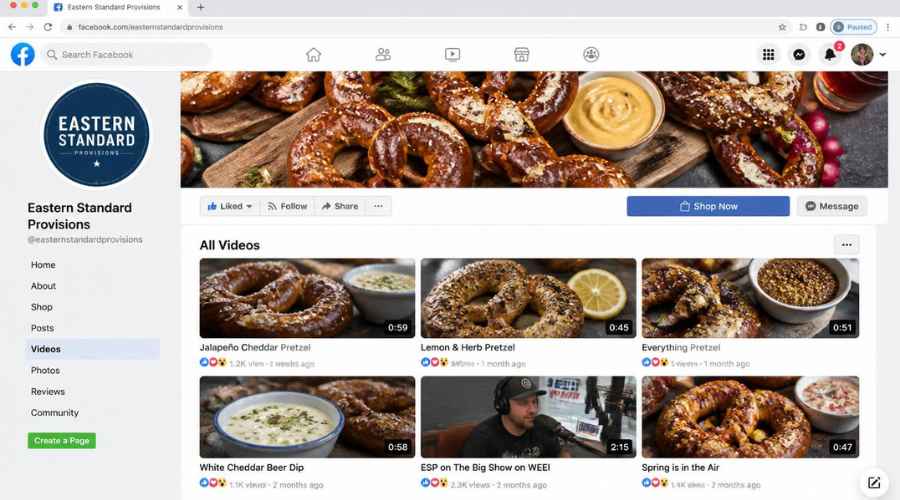
Sometimes Facebook uses auto-generated thumbnails, but they are often low quality, blurred images, or unflattering visuals. That’s why it is better to use still-image creation with bold thumbnail text, which improves click and view optimization and video topic clarity. Good thumbnails increase video engagement and improve user experience by attracting attention and increasing content visibility.
Size & image requirements for video thumbnails:
To avoid image cropping issues and poor display, you must follow Facebook’s thumbnail rules. The correct aspect ratio options are square format (1:1) or horizontal format (16:9). The recommended image size is 1200 x 675 pixels for best image quality.

Facebook supports different file formats, but JPG format and PNG format are best for upload requirements because they give better quality and faster loading.
In simple words, a good Facebook video thumbnail is a clear, high-quality visual that helps people understand the video quickly, improves visual marketing, and increases the chance that users will click and watch.
Facebook Video Thumbnails Best Practices & Examples
Facebook video thumbnails play a very important role in attracting Facebook users and improving engagement on video content. Strong thumbnail design is one of the most powerful tools for video campaigns because it directly affects click-through rate and user engagement.
Choose High-Quality Images (Image Size & Clarity)
One of the most important design tips is using high-quality images with the correct image size. High-resolution files improve image clarity and make your thumbnail look professional.
A clear and sharp image improves visual appeal, especially on small screen visibility where most users browse through busy feeds.

Avoid blurry or low-quality images because they reduce trust and lower clicks.

Use Bright & Attention-Grabbing Visuals
To make your thumbnail stand out in busy feeds, use bright colors and contrasting colors.
Stock images or commercial use images from an image library or tools like the Canvix tool can help you create strong background images.
Attention grabbing visuals increase click motivation and make users stop scrolling.
Create Strong Video Summarization
Your thumbnail should act like a quick video summarization so viewers understand the content instantly.
Use clear visuals that improve content understanding. For example, food visuals like mouth-watering imagery work very well because they quickly attract attention.
This helps users decide faster whether they want to watch the video or not.

Add Clear Text Overlay (Readability Matters)
Adding text overlay with the video title improves visibility and engagement.
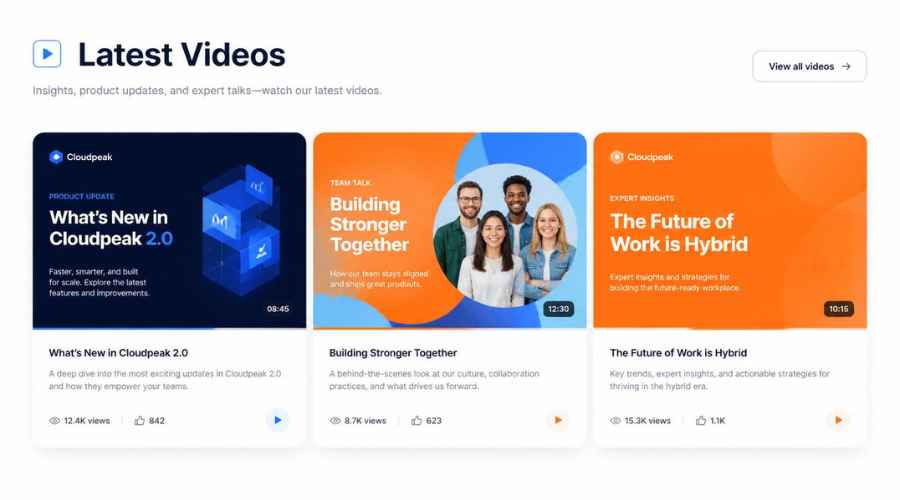
Make sure the text has:
- Good readability
- Strong smartphone readability
- Proper text styling
- Clear text borders
- Strong color contrast
This helps users understand the video even before playing it.
Use Branding for Recognition
Branding is very important for long-term growth.
Add:
- Logo placement
- Social branding elements
- A branded look
When you use a consistent design across videos, it builds brand awareness and improves content recognition and video recognition.
This is very effective in playlist design and marketing strategy because viewers start recognizing your content instantly.
Improve Performance in Video Campaigns
Good thumbnail design is a key part of video production process and video campaigns.

It directly improves:
- User engagement
- Click-through rate
- Visual communication
- Overall performance optimization
A strong thumbnail can turn a normal video into a high-performing video.
Final Thoughts
Final thoughts are that creating Facebook video campaigns is not just one simple step. It is a full video creation process that includes content strategy, execution process, video shooting, video editing, and sometimes adding closed captions.
The whole video production workflow is important, and every step affects the final result. One small but very important part is the video thumbnail importance. Many people ignore these small details, but they actually have a big performance impact on how many people watch the video.
Good design tips help improve marketing optimization and make your videos more attractive. Using tools like Canvix tool or other user-friendly tools makes it easier to create high-performing thumbnails for Facebook video thumbnails.
When thumbnails are designed well, they improve workflow efficiency, content quality, and engagement. This is part of visual marketing and thumbnail strategy, where creative design helps grab attention.
Good thumbnails also increase audience interaction and user feedback, especially in the comment section engagement, because more people watch and respond to the video.
Are you ready to step up your video thumbnail game? Start your free trial with canvix today
